01Native macOS app · Swift + PythonmacOS 原生应用 · Swift + Python
MD_reader
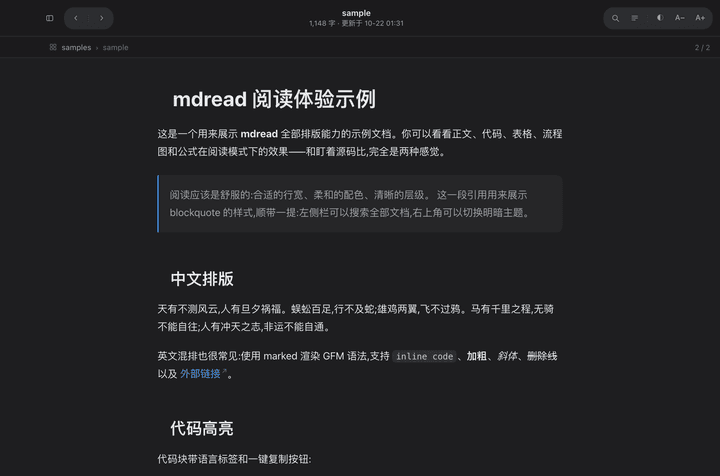
A quiet Markdown reader for the Mac: a native window around an offline renderer, with code, diagrams, math, search and keyboard navigation.一个安静的 Mac Markdown 阅读器:原生窗口里装着离线渲染,支持代码、流程图、公式、全文搜索和键盘导航。
01The problem问题
Reading notes shouldn’t need an editor.读笔记,不该非得打开编辑器。
Editors are for writing编辑器是用来写的
Opening a folder of Markdown notes in a code editor shows source, tabs and a file tree, not a page you want to read for an hour.用代码编辑器打开一文件夹的 Markdown 笔记,看到的是源码、标签页和文件树,而不是一个能安心读一小时的页面。
Renderers need the internet渲染器要联网
Most previewers load highlighting, diagrams and math from a CDN, so they break offline and leak what you read.大多数预览工具从 CDN 加载高亮、流程图和公式,离线就坏,而且会暴露你在读什么。
Mac first先照顾 Mac
It should open like any Mac app: double-click, drag a folder onto the window, or “Open With” from Finder.它应该像普通 Mac 应用一样打开:双击、把文件夹拖到窗口上,或者在访达里用「打开方式」。
02What I built我做了什么
A native window around a tiny local reader.原生窗口,包着一个很小的本地阅读器。
A Swift app opens a native window with a transparent title bar and a WKWebView, and starts a bundled Python engine on a free local port. The engine lists files, searches them, and serves one reading page.一个 Swift 应用打开带透明标题栏的原生窗口和 WKWebView,并在一个空闲的本地端口上启动内置的 Python 引擎。引擎负责列文件、搜索,以及提供唯一的阅读页面。
- Fully offline: marked, highlight.js, Mermaid and KaTeX are vendored, so nothing loads from the network.完全离线:marked、highlight.js、Mermaid 和 KaTeX 都打包在应用里,不从网络加载任何东西。
- Code blocks with a language label and one-click copy; Mermaid diagrams; inline and display math; relative images and cross-document links.代码块带语言标签和一键复制;Mermaid 流程图;行内和独立公式;相对路径图片和跨文档链接。
- Single-key navigation: / search, \ file tree, D outline, [ and ] previous and next, T theme, Esc close.单键导航:/ 搜索,\ 文件树,D 目录,[ 和 ] 上一篇和下一篇,T 切换主题,Esc 关闭。
- Light and dark themes follow the system; text size A−/A+ is remembered; a reading-progress bar.明暗主题跟随系统;字号 A−/A+ 会被记住;带阅读进度条。
- Its own design.md: type scale, list and table rules, and anti-patterns such as “no dashboard home page”.有自己的 design.md:字号层级、列表和表格规则,以及「不做仪表盘首页」这样的反模式。
03How it works怎么做的
Two small programs, one job each.两个小程序,各干一件事。
- STEP 01
Finder or drag-and-drop访达或拖放
A .md file or folder arrives at the Swift app.一个 .md 文件或文件夹交给 Swift 应用。
- STEP 02
Swift shellSwift 外壳
Picks a free port and starts the bundled Python engine.选一个空闲端口,启动内置的 Python 引擎。
- STEP 03
Python enginePython 引擎
/api/list, /api/file, /api/search over localhost only.只在本机提供 /api/list、/api/file、/api/search。
- STEP 04
WKWebView pageWKWebView 页面
Renders with vendored marked, highlight.js, Mermaid, KaTeX.用内置的 marked、highlight.js、Mermaid、KaTeX 渲染。
04Interface and details界面与细节
Everything is one key away.所有东西都只差一个键。
- 01 / 05
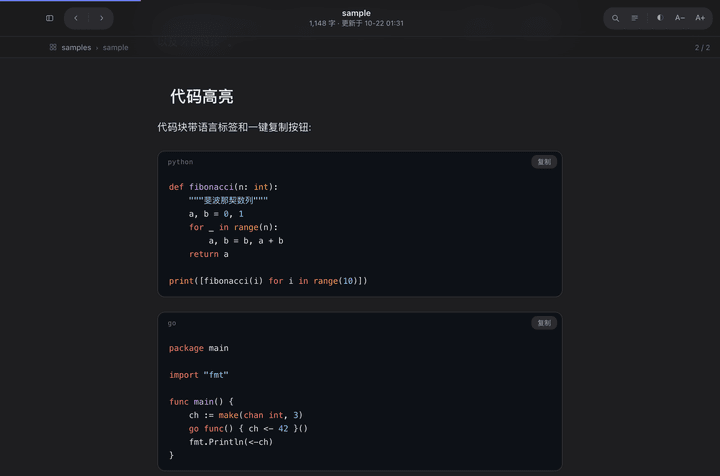
Code reads like code代码就该像代码
Each block is a rounded card with its language and a copy button. The highlight theme matches the reader’s own dark theme.每个代码块都是圆角卡片,带语言名和复制按钮。高亮配色和阅读器自己的深色主题一致。
- 02 / 05
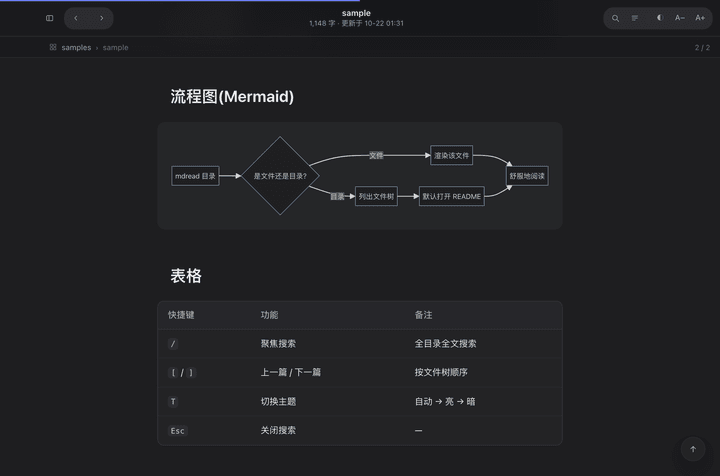
Diagrams and tables, offline流程图和表格,离线也能看
Mermaid draws flowcharts from text. Tables are cards with horizontal hairlines only, a rule written into the design doc.Mermaid 用文字画流程图。表格是只有横向发丝线的卡片,这条规则写在设计文档里。
- 03 / 05
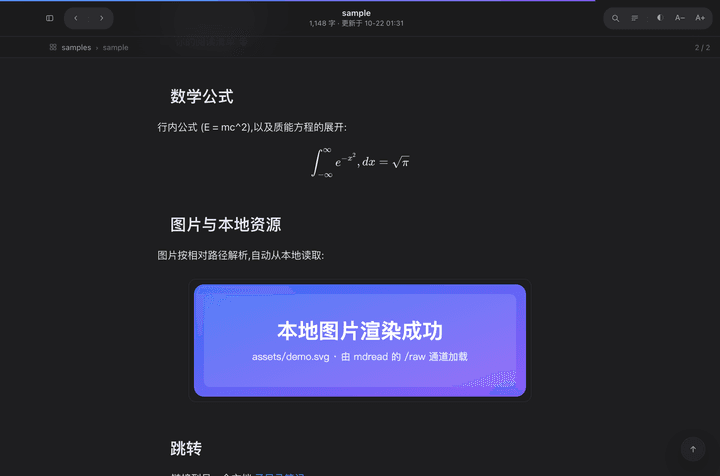
Math and local images公式和本地图片
KaTeX renders inline and display math. Relative image paths resolve against the document’s own folder.KaTeX 渲染行内和独立公式。相对路径的图片按文档自己所在的文件夹解析。
- 04 / 05
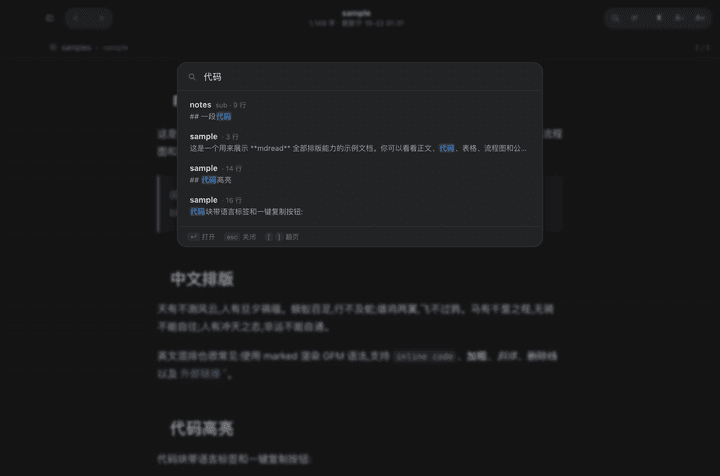
Press / to search everything按 / 搜索所有文档
Full-text search across the folder, with arrow keys to choose and Enter to open at the match.在整个文件夹里全文搜索,方向键选择,回车直接跳到匹配处。
- 05 / 05
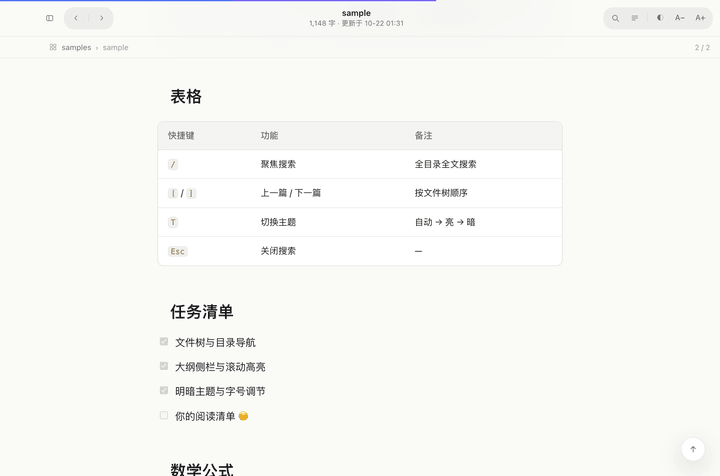
Light when the Mac is lightMac 是浅色,它也是浅色
Both themes are designed, not inverted: the code theme, the table head and the accent dots all change together.两套主题都是设计出来的,不是简单反色:代码配色、表头和强调色圆点一起变化。
05Tech used用到的技术
What it’s made of.用什么做的。
- App应用
- Swift
- AppKit
- WKWebView
- swiftc
- Engine引擎
- Python 3
- http.server
- no dependencies无第三方依赖
- Rendering渲染
- marked
- highlight.js
- Mermaid
- KaTeX
- Languages语言占比
- Python 83%
- Swift 16%
- Shell 1%
06What I learned我学到了什么
Lessons I’ll keep.会一直记得的几件事。
- Small tools deserve a design doc too. Writing down “no dashboard, one column, hairline tables” settled arguments before they started.小工具也值得一份设计文档。先写下「不做仪表盘、单栏、发丝线表格」,很多争论还没开始就结束了。
- Let each language do what it’s best at. Swift owns the window and the Mac behaviours; Python owns files and text. Neither had to be clever.让每种语言做它最擅长的事。Swift 管窗口和 Mac 的行为,Python 管文件和文字。两边都不需要耍聪明。
- Check with real screenshots. The first build looked fine in code review but every library 404’d; a screenshot check caught it in one round.用真实截图检查。第一版在代码审查时看起来没问题,但所有渲染库都 404;截图检查一轮就发现了。