06LynShenTauri + Svelte · Rust engineTauri + Svelte · Rust 引擎
Aogiri Desktop + CLIAogiri 桌面端 + CLI
A desktop workbench for coding agents and the Rust engine behind it: plans, subagents, approvals, and a phone that can answer them.给编程智能体用的桌面工作台,以及背后的 Rust 引擎:计划、子智能体、审批,还能在手机上回复审批。
01The problem问题
Agents are powerful. Watching them is hard.智能体很强,但很难看清它在做什么。
One terminal per agent一个智能体一个终端
Coding agents each live in their own terminal. Running several tasks across projects means juggling windows and losing track.每个编程智能体都住在自己的终端里。跨项目跑几个任务,就要在窗口之间来回切,很容易跟丢。
Trust needs a gate信任需要一道门
An agent that can run commands needs clear rules for what it may do alone, and a fast way to ask a person for the rest.能执行命令的智能体,需要清楚的规则:哪些可以自己做,其余的要能快速问人。
You are not always at the desk人不总在电脑前
Long tasks stall on a single approval while you are away. The question should follow you, safely.长任务常常卡在一个审批上,而你刚好不在。这个问题应该安全地找到你。
02What I built我做了什么
A workbench, an engine, and a remote.一个工作台,一个引擎,一个遥控器。
Desktop桌面端
Many projects, many sessions, one window多项目、多会话,一个窗口
Each session picks its agent. Files, Git with worktrees for parallel tasks, a terminal and a built-in browser sit beside the chat. Plan mode shows the plan on its own page as it is written.每个会话自选智能体。文件、Git(并行任务用 worktree)、终端和内置浏览器都在对话旁边。计划模式会把计划边写边显示在独立页面上。
Engine引擎
One agent core, many front ends一个智能体内核,多种前端
The Rust engine runs as a TUI, as headless JSONL for scripts and CI, over stdio for GUIs, over ACP for editors, and as a daemon hosting many sessions. Built-in subagents, skills and MCP (prompts, resources, OAuth).Rust 引擎可以作为终端界面、给脚本和 CI 用的无界面 JSONL、给图形界面用的 stdio、给编辑器用的 ACP,以及托管多个会话的守护进程运行。内置子智能体、技能和 MCP(提示、资源、OAuth)。
Safety & remote安全与远程
Four approval modes, a sandbox, a phone四种审批模式、沙箱和手机
Manual, auto-edit, auto and full access. Shell commands run in an OS sandbox (Seatbelt, bubblewrap); git push always asks. Approvals reach the phone through an encrypted relay with push and quiet hours.手动、自动编辑、自动和完全访问。命令在系统沙箱里执行(Seatbelt、bubblewrap);git push 总要确认。审批经加密中继推送到手机,带免打扰时段。
03How it works怎么做的
The UI is a client. The daemon is the source of truth.界面只是客户端,守护进程才是真相。
- STEP 01
Desktop task桌面任务
One sentence in a session.会话里的一句话。
- STEP 02
Plan + subagents计划 + 子智能体
The engine splits and runs steps.引擎拆分并执行步骤。
- STEP 03
Sandbox gate沙箱关口
A risky command needs approval.有风险的命令需要审批。
- STEP 04
Encrypted relay加密中继
Noise IK; push to the phone.Noise IK;推送到手机。
- STEP 05
Approve on phone手机上批准
Face ID, then the task continues.Face ID 之后,任务继续。
04Interface and details界面与细节
Designed to be read at a glance.一眼就能看懂。
- 01 / 04
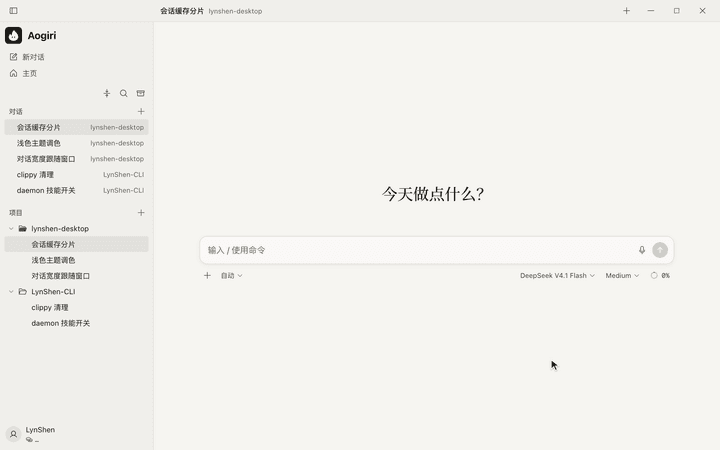
Start with one sentence从一句话开始
Projects and sessions live in a dense sidebar; the canvas stays empty until you ask. The model picker sits in the input bar.项目和会话放在紧凑的侧栏里;画布在你开口前保持空白。模型选择就在输入栏里。
- 02 / 04
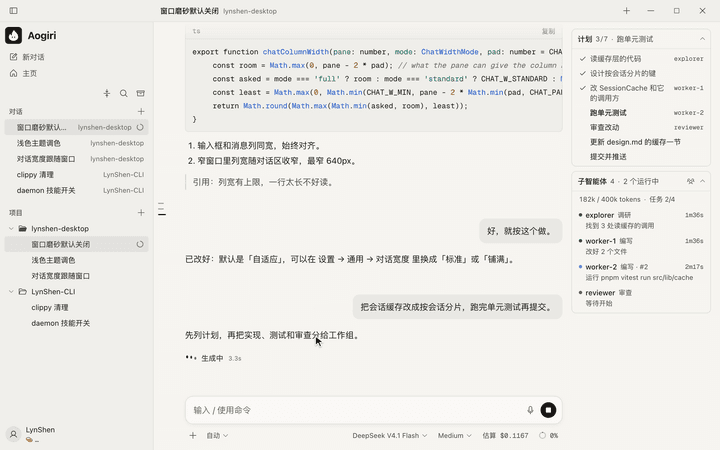
Plan and subagents, side by side计划和子智能体并排
The plan panel ticks off steps as they finish. The subagents card shows each agent’s role, state and elapsed time, and opens its own conversation.计划面板随步骤完成逐项打勾。子智能体卡片显示每个智能体的角色、状态和耗时,点开就是它自己的对话。
- 03 / 04
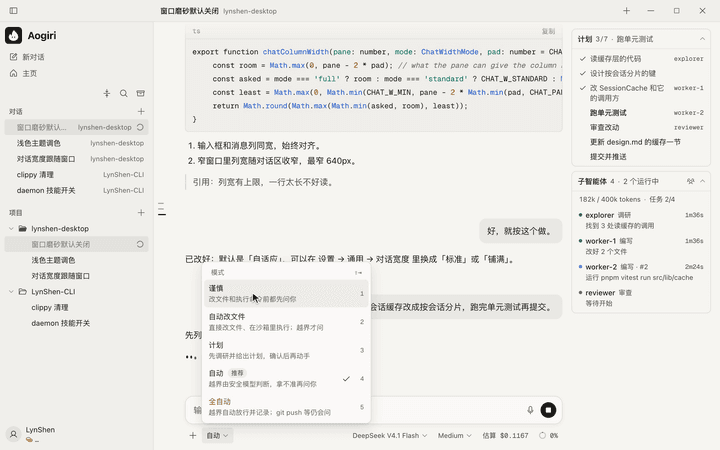
Choose how much to trust自己决定信任多少
Modes from read-only to full access, each with a one-line description and a shortcut key. A plan can be approved straight into any mode.从只读到完全访问,每种模式都有一句说明和快捷键。计划可以直接批准进入任何一种模式。
- 04 / 04
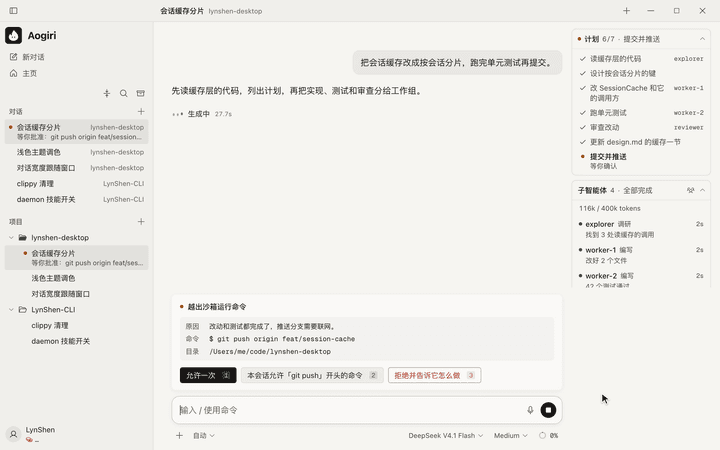
Ask before it leaves the sandbox离开沙箱之前先问
The card says why, the exact command and the directory. Keys 1, 2 and 3 answer it; a dock badge and an OS notification show that something is waiting.卡片写清原因、完整命令和目录。按 1、2、3 就能回答;程序坞角标和系统通知提示有事在等。
✦Hand-off接力
Leave the desk. Keep the decision.人离开桌子,决定权还在手里。
Scroll to follow one task from the desktop to an approval on the phone.向下滚动,跟着一个任务从桌面端走到手机上的确认。
- One sentence一句话You describe the task on the desktop.在桌面端说清楚要做什么。
- A plan一份计划The agent splits it into steps and starts.智能体拆成几步,开始执行。
- A gate一道闸Pushing code needs a human. It stops and asks.推送代码需要人来确认,它停下来询问。
- To your phone到你手机上The request travels end-to-end encrypted, with a push.请求端到端加密传过去,并推送提醒。
- Allow允许One tap. The desktop picks up where it stopped.点一下,桌面端从停下的地方继续。
Scroll to scrub滚动拖动播放
Seven steps, one sweep.七步,一扫而过。
When the last step finishes, a light sweep runs down the list once. Scroll to move through it frame by frame.最后一步完成时,一道光沿列表扫过一次。滚动页面可以逐帧查看。
Micro-interactions微交互
Small motion, clear state.动得少,状态清楚。
Subagents slide into their card as they start, and the recap card summarises what changed when a task ends. One easing curve, no bounce, and every animation has a reduced-motion path.子智能体启动时滑进卡片,任务结束时回顾卡总结改了什么。只用一条缓动曲线、不回弹,每个动画都有减少动态效果的版本。
05Tech used用到的技术
What it’s made of.用什么做的。
- Desktop桌面端
- Tauri 2
- Svelte 5
- SvelteKit (SPA)
- Vite 8
- TypeScript 6
- CodeMirror 6
- xterm.js
- Engine引擎
- Rust workspace
- agent-core
- daemon
- TUI
- Seatbelt · bubblewrap
- MCP
- ACP
- Remote远程
- Go relay
- Noise_IK_25519_ChaChaPoly_SHA256
- Web Push (VAPID)
- APNs · FCM
- PWA
- Quality质量
- 1,267 Rust tests (engine)1267 个 Rust 测试(引擎)
- ~1,500 Vitest cases (desktop)约 1500 个 Vitest 用例(桌面端)
- Playwright browser regressionsPlaywright 浏览器回归
- Releases版本
- Desktop v0.10.4桌面端 v0.10.4
- CLI v0.7.8CLI v0.7.8
- Apache-2.0
- macOS · Windows · LinuxmacOS · Windows · Linux
06What I learned我学到了什么
Lessons I’ll keep.会一直记得的几件事。
- Put state where it survives. Moving sessions into a daemon meant closing the window no longer killed work, and the phone could join the same session.把状态放在活得久的地方。会话搬进守护进程以后,关窗口不再打断工作,手机也能加入同一个会话。
- Safety is a design problem. Approval modes only help if people understand them in one line; the menu copy was rewritten more than the code.安全也是设计问题。审批模式只有一句话能看懂才有用;菜单文案改的次数比代码还多。
- Never send secrets in a notification. Push text is limited by policy: it never contains commands or file paths, only that something needs you.通知里不放敏感内容。推送文字有规则限制:从不包含命令或文件路径,只说明有事需要你。