07LynShenReact Native · Swift · KotlinReact Native · Swift · Kotlin
Aogiri for iPhone & AndroidAogiri 手机端
A pocket companion called Lumen that sets real alarms, writes to your calendar, and approves your computer’s next step.口袋里的伙伴 Lumen:能定真的闹钟、写日历,也能替你批准电脑的下一步。
01The problem问题
An assistant that talks, but can’t do.会聊天,却办不了事的助手。
Chat ends at text聊天停在文字
Asking an assistant to “wake me at 7” usually ends with instructions, not an alarm.让助手「明早 7 点叫我」,通常得到的是操作说明,而不是一个闹钟。
Actions need receipts动作需要回执
When an app acts for you, you need to see exactly what it did, and undo it in one tap.应用替你做事时,你得清楚看到它做了什么,并且一下就能撤销。
Your computer is elsewhere电脑不在手边
The desktop agent needs a person for risky steps. The phone is the one device that is always with you.桌面智能体在有风险的步骤上需要人来拍板,而手机是唯一一直在你身边的设备。
02What I built我做了什么
A companion with hands.一个能动手的伙伴。
Three swipeable tabs: 伙伴 (companion), 今天 (Today) and 电脑 (Computer). Lumen, a glowing ember you can name and reshape, lives in every top bar and reacts to what it is doing.三个可以左右滑动的标签:伙伴、今天和电脑。Lumen 是一团可以取名、可以换形状的光,待在每个页面的顶栏里,并随着它在做的事变换神态。
- Real alarms and timers through AlarmKit (iOS 26+), calendar events, system reminders, maps hand-off, calls, SMS and mail.通过 AlarmKit(iOS 26+)设置真正的闹钟和计时器,写日历、系统提醒,交给地图导航,打电话、发短信和邮件。
- On Android, screen control through Shizuku: read the screen, tap, type, swipe, toggle settings, with confirmation first.在 Android 上通过 Shizuku 控制屏幕:读屏、点按、输入、滑动、切换设置,先确认再执行。
- Every action becomes a ledger line under the reply, with Undo.每个动作都会在回复下面记成一行账本,可以撤销。
- The computer remote: QR pairing with a 6-digit check code, live sessions, the plan sheet, approvals with Face ID, and push with Allow/Deny actions.电脑遥控:扫码配对加 6 位校验码,实时会话、计划面板、需要 Face ID 的审批,以及带「允许 / 拒绝」按钮的推送。
03How it works怎么做的
JavaScript for the product, native code where the OS insists.产品逻辑用 JavaScript,系统要求的地方用原生代码。
- STEP 01
“Wake me at 7”「明早 7 点叫我」
Said to the companion.对伙伴说一句话。
- STEP 02
Tool call工具调用
set_alarm with a time.带时间的 set_alarm。
- STEP 03
Native module原生模块
Swift → AlarmKit.Swift → AlarmKit。
- STEP 04
Ledger line账本行
What was done, with Undo.做了什么,可撤销。
04Interface and details界面与细节
Ask once. See exactly what happened.说一次,就看清发生了什么。
- 01 / 06
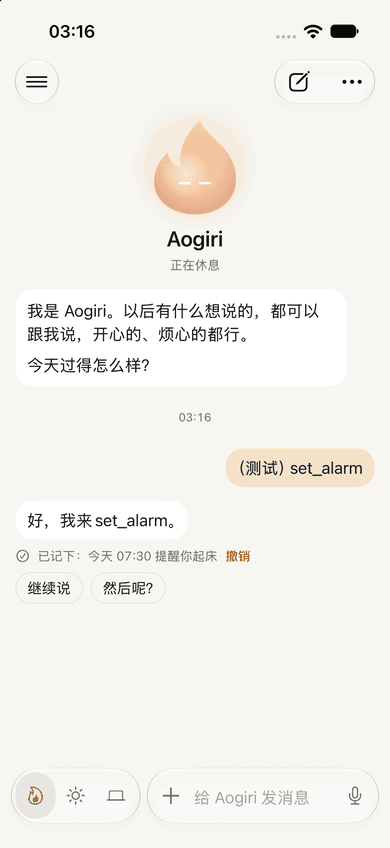
A real alarm, with a receipt真的闹钟,带回执
The companion calls the system alarm and writes what it did under the reply. One tap undoes it.伙伴调用系统闹钟,并把做了什么写在回复下面。点一下就能撤销。
- 02 / 06
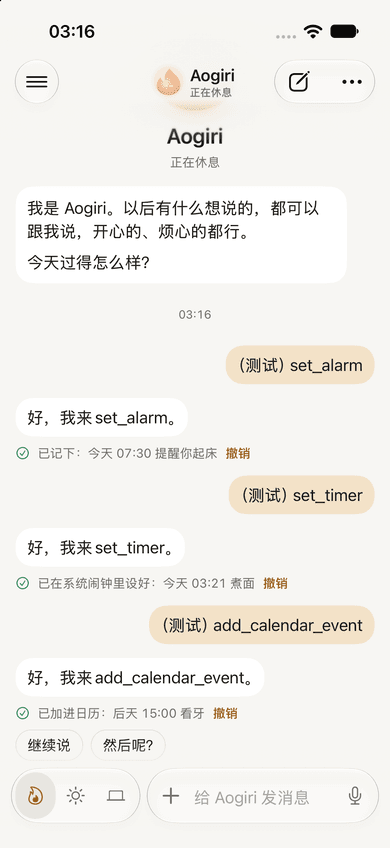
Into your calendar写进你的日历
Events land in the system calendar, not a private list, so every other app sees them too.事件写进系统日历,而不是应用自己的列表,所以其他应用也能看到。
- 03 / 06
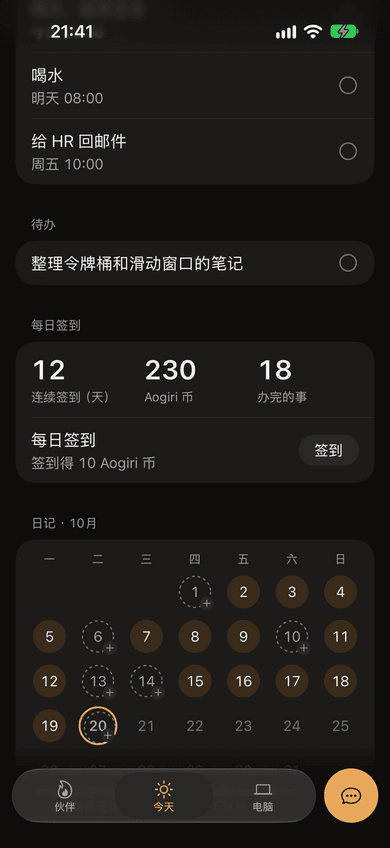
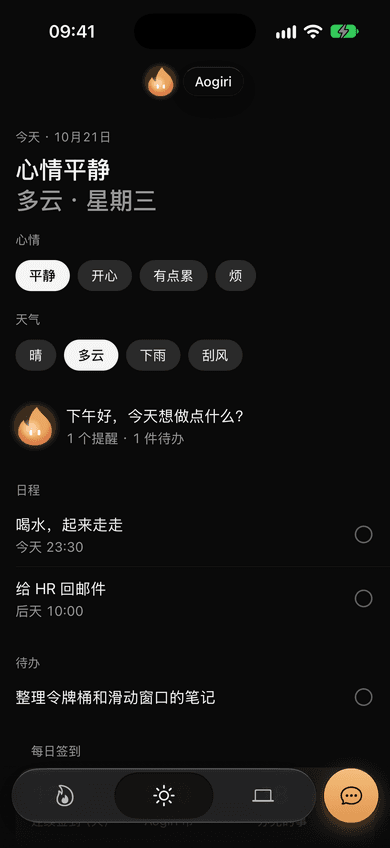
Today, in two lines今天,两行写完
A calm headline (mood, then weather and weekday) over an agenda of reminders and to-dos, plus a check-in calendar.安静的标题(心情,然后是天气和星期),下面是提醒和待办,还有签到日历。
- 04 / 06
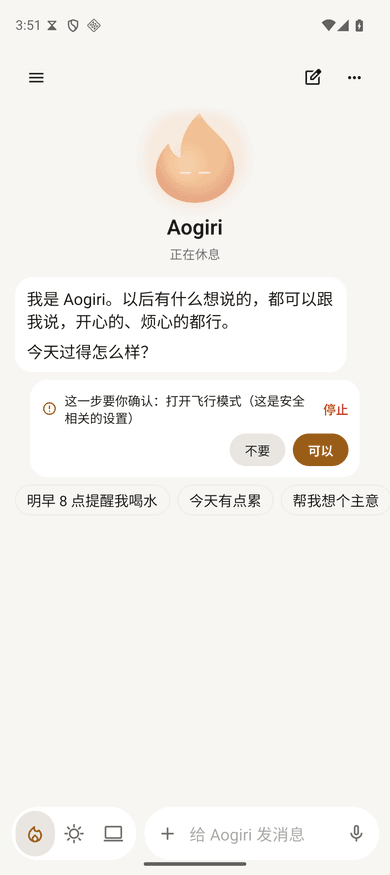
Android can go furtherAndroid 能走得更远
With Shizuku the companion can change settings or operate another app, and always asks first.有了 Shizuku,伙伴能改设置、操作别的应用,而且每次都先问你。
- 05 / 06
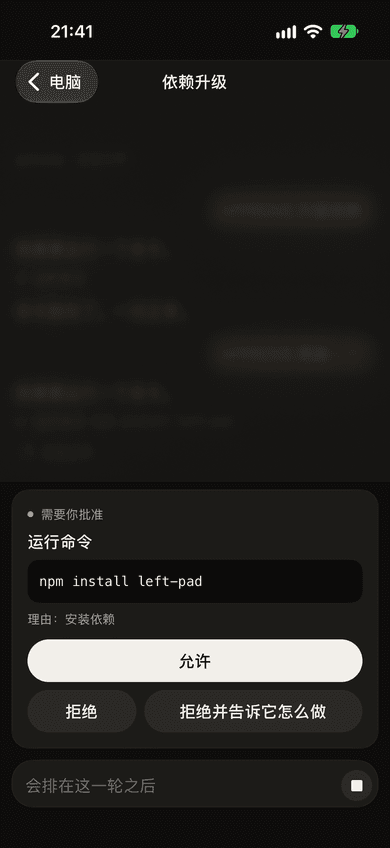
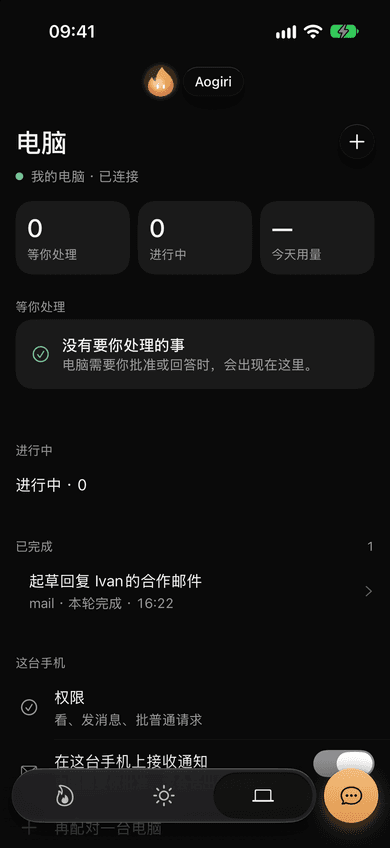
Your computer, in your pocket口袋里的电脑
Sessions stream live from the paired computer. Approvals arrive as a deck of cards; risky ones require Face ID.已配对电脑上的会话实时同步过来。审批以一叠卡片的形式出现;有风险的需要 Face ID。
- 06 / 06
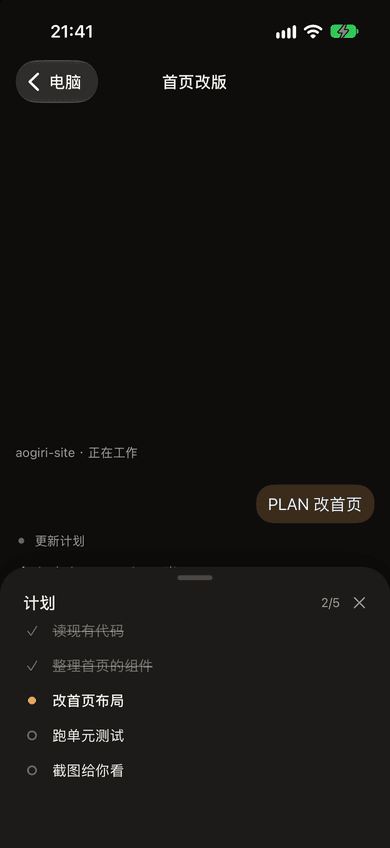
The same plan, everywhere同一份计划,到处都一样
The plan you saw on the desktop opens as a sheet on the phone, step by step, with who is doing what.电脑上看到的计划,在手机上以面板打开,逐步列出,谁在做什么一目了然。
✦The glass redesign通透改版
Before and after. Drag the light.改版前后。拖动这道光。
Ten changes, each with a reason, checked on an iOS simulator and an Android emulator in dark and light. Drag the handle, or focus it and use the arrow keys. Pick a screen below.十项改动,每项都写了理由,在 iOS 模拟器和 Android 模拟器的深浅两种模式下检查过。拖动把手,或者聚焦后用方向键。在下面选一个页面。
Before改版前
- Warm brown surfaces everywhere到处是暖棕色底
- 40 pt bold headline, three lines三行 40pt 粗体标题
- Flat grey edges on every control每个控件都是平平的灰边
- Amber used for five different meanings琥珀色同时表达五种意思
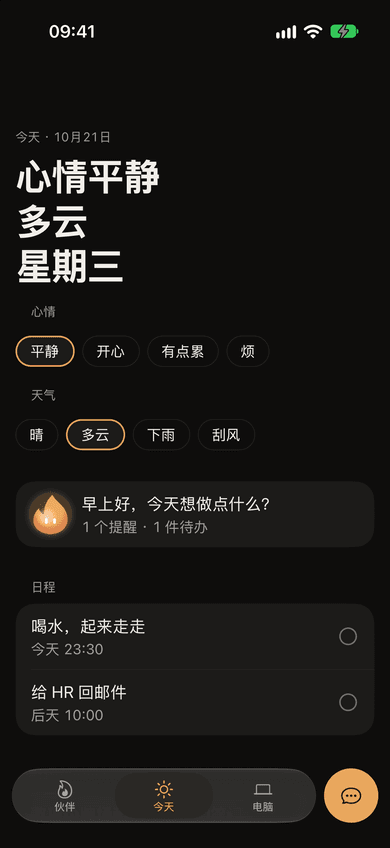
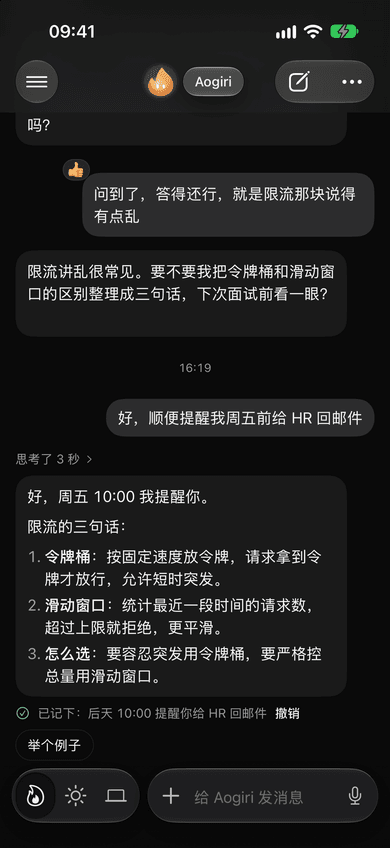
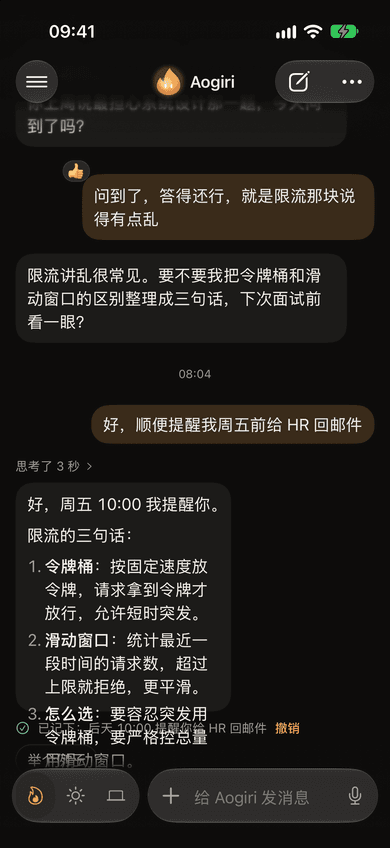
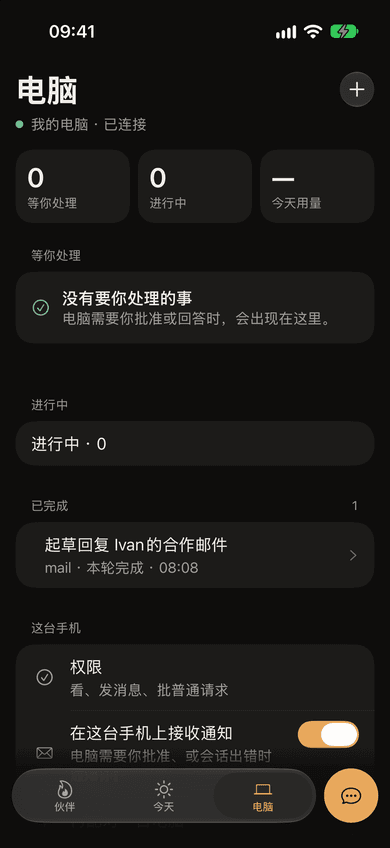
After改版后
- A neutral base, so content leads中性底色,让内容先说话
- 26 pt medium, two lines两行 26pt 中等字重
- A rim of light: bright on top, fading down一圈光边:上沿亮,往下渐暗
- Amber only for the companion and the one primary action琥珀色只留给伙伴和唯一的主操作
Three tabs you can swipe.三个能滑动的标签。
The tab bar is an icon-only glass capsule next to an amber “talk to companion” button that becomes the message field on the chat tab. Android has no system blur, so it gets a translucent chrome with a top-lit gradient instead.标签栏是一枚只有图标的玻璃胶囊,旁边是琥珀色的「和伙伴说」按钮,在对话页会变成输入框。Android 没有系统模糊,所以改用半透明底加顶光渐变。
05Tech used用到的技术
What it’s made of.用什么做的。
- App应用
- Expo 57
- React Native 0.86
- React 19
- Expo Router
- Reanimated 4
- react-native-svg
- zustand 5
- TypeScript 6
- Native原生
- Swift · AlarmKit
- App Intents
- Kotlin · Shizuku
- 5 config plugins5 个配置插件
- Security安全
- Noise IK (@noble)
- Keychain
- Face ID / passcode
- APNs · FCM
- Design设计
- Night Lamp design system「夜灯」设计规范
- 3 glass materials3 种玻璃材质
- 4 pt grid4pt 网格
- System fonts, 3 weights系统字体,3 种字重
- Quality质量
- 312 Vitest tests312 个 Vitest 测试
- iOS simulator + Android emulator shotsiOS 模拟器 + Android 模拟器截图验收
06What I learned我学到了什么
Lessons I’ll keep.会一直记得的几件事。
- Show the work. The ledger line with Undo did more for trust than any wording. People relax when they can see and reverse an action.把做了什么摆出来。带「撤销」的账本行,比任何措辞都更能建立信任。能看到、能撤回,人就放心了。
- Restraint is a feature. The redesign removed colour more than it added it: amber now means “the companion” or “the one thing to press”.克制本身就是功能。这次改版删掉的颜色比加的多:现在琥珀色只代表「伙伴」或「唯一该点的那个按钮」。
- Platforms differ; respect it. Android has no system blur and iOS has no Shizuku. Each platform got its own best version instead of a lowest common denominator.平台不同,就尊重不同。Android 没有系统模糊,iOS 没有 Shizuku。每个平台都做到自己最好的版本,而不是取最低公约数。